
TL;DR
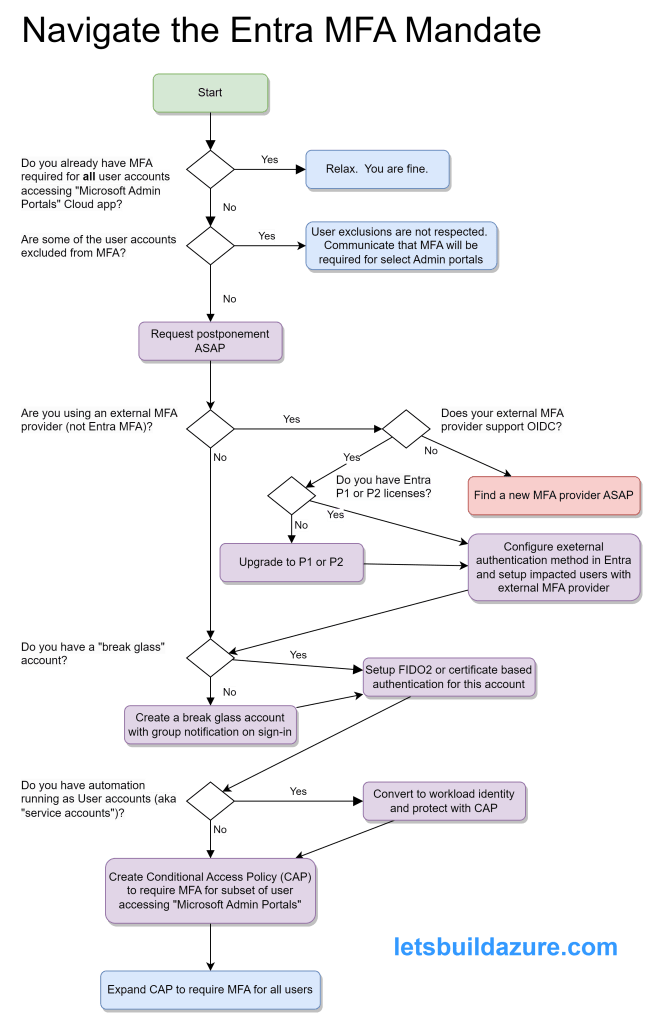
You can mess up your entire company if you hastily react to Microsoft’s mandate for multifactor authentication (MFA). If you aren’t ready by October 15, 2024:
- apply to postpone the enforcement date
- plan your success (using this article as your guide)
- succeed with your plan
But is this really required? “Yes…there are no exceptions” per the Mandatory MFA FAQs
- TL;DR
- This Is Just the Beginning
- What is an Entra tenant?
- Which Kind of Accounts are Impacted?
- Which Kind of Accounts are Not Impacted?
- But How Do I Address Potential Problems
- In Closing
This Is Just the Beginning
I suspect somebody at Microsoft was fed up with being blamed for breaches caused by customers misconfiguring their own environments. The MFA requirement is one of several “best practices” that MSFT is now requiring all customers adhere to. For another example, see my post about private subnets.
No more Mr. Niceguy…but it really is for you own good
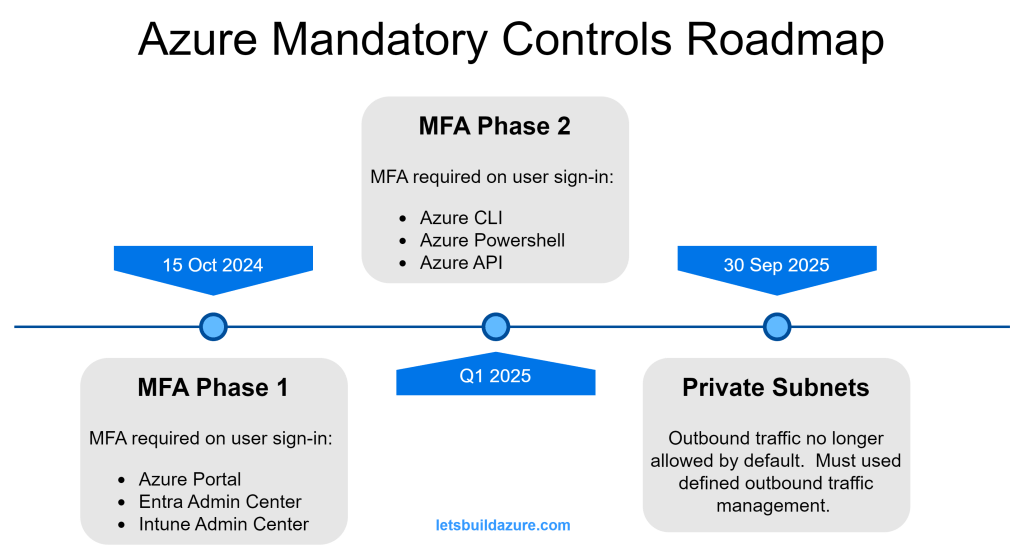
The MFA mandate is spread across multiple phases (two announced so far, but you should expect more). Phase 1 and Phase 2 impacts power-users (admins, cloud developers, etc.); everyday users don’t use these services and will not be impacted by Phase 1 or Phase 2 mandate.
Phase 1 Impact
- Azure portal (portal.azure.com)
- Entra admin center (entra.microsoft.com)
- Intune admin center (intune.microsoft.com)
Phase 2 Impact
- Azure CLI
- Azure Powershell
- Azure API clients (like Terraform)
Congratulations! if you use any of the above services, you are a power-user (even if you just have Reader permissions).
What is an Entra tenant?
Not sure what an Entra tenant is? All Microsoft cloud products are tied to a tenant. If your company uses any of these clouds, they have at least one tenant.
- Azure cloud (and Azure DevOps)
- M365 (Office, Teams, Sharepoint, OneDrive, Intune, etc.)
- D365 (CRM, ERP)
- Power Platform (Power BI, Power Apps, etc.).
According to Bing Copilot…”describe an Entra tenant to me”
A Microsoft Entra tenant is essentially a dedicated instance of Microsoft Entra ID (formerly Azure Active Directory) that an organization uses to manage its users, groups, and resources. Here are some key aspects:
- Identity Management: It provides a centralized platform for managing user identities, including employees, partners, and customers.
- Access Control: Entra tenants allow you to control access to applications and resources through policies and role-based access control (RBAC).
- Security: Features like multi-factor authentication (MFA), conditional access policies, and identity protection help secure user accounts and data.
- Collaboration: Supports B2B collaboration by allowing guest users from other organizations to access resources securely.
- Integration: Can be integrated with various identity providers and applications to streamline authentication and single sign-on (SSO).
Which Kind of Accounts are Impacted?
Member and Guest User Accounts
This mandate applies to all “user” accounts in your Entra tenants, regardless of type.
Member accounts are user identities that belong to the Entra tenant. These accounts are “homed” to the Entra tenant they are a member of. It’s common to setup synchronization between your on-prem Active Directory using Entra Connect. Accounts created by this synchronization are considered Member accounts.
Guest accounts are external user identities registered with the Azure tenant. It is very common to setup a B2B trust between your Entra tenant and a third party’s trusted identity provider (IdP). Guest accounts may be “homed” in another Azure tenant or they may be “homed” in a completely separate IdP platform (such as Okta or Ping Federate).
Shared Accounts
With the exception of “break glass” accounts, discussed later, this is not a recommended practice.
User accounts should be assigned to individuals only…but the reality is there are common accounts used by a group or team that shares the credentials. This brings a problem of reduced traceability and individual accountability.
This mandate applies to shared accounts (since they are really just “user” accounts assumed by multiple individuals).
Service Accounts
The term “service account” is not the same as a Service Principal (which is discussed later). I am using “service account” to describe those situations where you have automated processes interacting with Entra, Azure, or other Microsoft Cloud apps as a “User”.
Like all User accounts, service accounts will be impacted.
“Break Glass” Accounts

Break glass accounts are Member accounts with tightly managed credentials. Similar to a shared accounts, the credentials of a “break glass” account are shared amongst a small group or team. Unlike shared accounts, the “break glass” account is only used in emergency situations – they are critical to prevent you from getting locked out of your tenant.
These accounts are subject to the same MFA requirement as all other User accounts.
Which Kind of Accounts are Not Impacted?
Service Principals, App Registrations, and Enterprise Apps
These three entities are often confused. When you setup an App Registration or an Enterprise App, an associated Service Principal is created in your Entra tenant. The Service Principal is the identity that the App Reg or Enterprise App uses when interacting with your tenant, Azure resources, or other Microsoft Cloud elements.
To make a long story short, Service Principals are not impacted by this mandate; neither are the App Registrations nor the Enterprise Apps.
Managed Identities
Managed identities are very similar to Service Principals, but they can only be used by workloads running in Azure. Behind the scenes, Managed Identities have a Service Principle but, unlike a Service Principle, you do not control the authentication keys and certificates used by these non-human identities (they are managed by Microsoft).
Managed identities are not impacted by this mandate.
But How Do I Address Potential Problems
Mandatory Microsoft Entra multifactor authentication (MFA) – Microsoft Entra ID | Microsoft Learn provides good guidance on the actions to prepare for mandatory MFA. I am summarizing points from that article here.
Service Accounts
If you know about specific service accounts in use, migration them to use a workload identity (a Service Principal or Managed Identity) so you secure your cloud-based service accounts.
Entra sign-in logs can help you identify the service accounts failing MFA and the Export-MSIDAzureMfaReport generates a helpful report to see which accounts are not using MFA. Once you have enabled the MFA CAP, you’ll quickly see which accounts are repeatedly failing the MFA criteria.
Don’t feel too bad if some of the automation using these accounts temporarily breaks – it should have never been setup like this to begin with.
“Break Glass” Account
Microsoft Authenticator is not an ideal method for MFA of this kind of account because you can only associate it with one phone. When problems occur, you don’t want to depend on a single individual to log in.
For smaller organizations, you can create separate break glass accounts for each individual and they can register their own phone.
But for larger organizations, this can be unwieldy so enable FIDO2 passkeys for your organization and get the various individuals that may need to use this account setup BEFORE you create a Conditional Access Policy requiring MFA. Certificate-based authentication is another method to setup multiple individuals with MFA ability using the break glass account.
Regardless of the approach (individual break glass accounts or a shared account) it’s important to monitor sign-in and audit logs so you’re alerted whenever one of the break-glass accounts is used. This alert can be email and/or SMS and/or Team message (or all of those). These are powerful accounts and you want to watch them closely.
Member and Guest Accounts
If you don’t plan on using one of the Entra’s built-in MFA methods then you need to configure an external authentication method.
Entra Conditional Access Policies (CAPs) are very powerful but also rather straight-forward. You can configure a wide variety of criteria to secure your tenant and the cloud applications using your tenant for authentication.
At a minimum, you should create a CAP requiring MFA for anybody accessing the Cloud app “Microsoft Admin Portals” – this covers more than the Phase 1 applications that require MFA, but if you are going through this process, you might as well get ahead of the curve.
It’s a good practice to Exclude certain users or groups when you create a new CAP – this prevents you from locking yourself out if something was misconfigured. Be sure to include some of the other Entra admins in this CAP so they can test their access.
Review the Entra sign-in logs to of somebody involved in the test to ensure the MFA CAP was applied to their sign-in attempt. Once verified, you can remove yourself from the exclusion.
In Closing
Over and over again, MFA is a proven method to improve your security posture. Ideally, you implement MFA for all of your cloud apps, but Microsoft is leaving you no choice but to implement MFA for the sensitive admin apps used to manage a variety of their popular cloud based services.
More details to come around the changes required to handle potential problems with the Phase 2 changes. Implement the changes described in this article and you’ll have much less to worry about when that time comes.
 Let's Build Azure!