
Category: Uncategorized

  • Passkeys: A New Era in Digital Authentication

    TL;DR

    People are the weakest link your in security chain. We can all be tricked and few of us are cyber-vigilant 100% of the time.

    Can we improve security and enhance user satisfaction at the same time?

    Passkeys are a revolutionary shift in how we demonstrate “I am who I say I am” (aka. authentication, aka. authn). They are a secure and user-friendly alternative to traditional passwords.

    Passkeys provide a robust alternative to traditional passwords.

    With over 15 billion passkey-enabled accounts globally, the adoption is rapidly increasing.

    Organizations recognize the benefits of both improved security and user experience.

    Advantages include:

    Phishing Resistance: Passkeys are bound to specific domains, making them ineffective on fraudulent sites.

    User Experience: Passkeys streamline the login process, resulting in faster authentication and reduced cognitive load for users.

    Unique Credentials: Each service receives a distinct key pair, eliminating the risk of password reuse

    Automatic Strength: Keys exceed the strength of human-created passwords

    Reduced Social Engineering Risks: With no memorable secrets to extract, the potential for somebody to socially engineer your password is significantly diminished

    But passkeys face several implementation challenges:

    Device Dependency: A significant portion of enterprises (43%) cite the complexity of implementing passkeys due to device compatibility issues.

    Recovery Risks: Users risk losing access if all authenticated devices are lost, necessitating robust fallback protocols.

    Cross-Platform Gaps: Support for passkeys varies across ecosystems, particularly between Apple, Google, and Microsoft.

    Legacy System Inertia: Many organizations still rely on passwords, with 56% of enterprises continuing to use them even after adopting passkeys.

    Learning Curve: Everybody understands passwords, while passkeys (and the key management) are something new.

    This post delves into the benefits of passkeys, their mechanics, the adoption trends, and the challenges they present.

    1. TL;DR
    2. The Dichodomy of Security and Usability
      1. Phishing Resistance
      2. Preventing Poor Cyber Hygeine
    3. How Do Passkeys Work? The Tech Behind the Magic
      1. Registration Ceremony
      2. Authentication Flow
    4. Passkeys are Working: Adoption Trends You Need to Know
      1. Enterprise Adoption Trends
    5. Passkeys vs. Traditional MFA: The Showdown
      1. Defining Traditional MFA
      2. Simplifying Authn with Passkeys
      3. Improved Security Posture
    6. The Flip Side: Challenges and Limitations of Passkeys
    7. Looking Ahead: The Future of Passkeys in Authentication
      1. Upcoming Innovations in Passkey Technology
    8. In Conclusion: Embracing the Passkey Revolution

    The Dichodomy of Security and Usability

    Former FBI Director William H. Webster “There is always too much security until it is too little”

    Between professional life and personal life, we consistently use compute devices (phones, televisions, tablets, workstations, etc.). It’s near impossible to have your “guard up” every time you’re online.

    Passkeys improve user experience:

    Speed: Users experience significantly faster logins with passkeys. For example, Amazon users log in six times faster using passkeys than with traditional methods.

    Success Rate: According to a MSFT study, the success rate for passkey authentication is 98%, while traditional password methods struggle with a mere 32% success rate.

    Cognitive Load: Passkeys eliminate the need for users to manage passwords, reducing the cognitive burden associated with remembering and entering credentials (which explains the higher login success rate).

    Dashlane’s findings indicate that passkeys can lead to a 70% increase in conversion rates compared to password-based authentication, demonstrating their potential to enhance user engagement.

    Phishing Resistance

    We are all vulnerable to a well-crafted phishing attack. Sophisticated attackers use techniques that can fool even the most cyber savvy person while winding-down from a long day.

    The cryptographic architecture underpinning passkeys, binds credentials to specific web domains. This architecture prevents phishing attempts, as passkeys can only be used on legitimate sites. Whenever you authenticate, the passkey verifies the website’s authenticity before proceeding. This means that even if a your were somehow tricked into visiting a fraudulent site, the passkeys remain secure and unusable on that domain.

    This is a significant improvement over traditional passwords, which can be easily entered on phishing sites that look identical to real sites.

    Preventing Poor Cyber Hygeine

    Let’s admit it, the fantasy of a centralized and trusted provider that manages your identity across all online services is just that – a fantasy. Your place of work may have single sign on (SSO) and you may be using Google or Microsoft to for many personal sites, but there is always going to be a large number of platforms that aren’t integrated.

    This means you need to keep track of authentication credentials for hundreds, if not thousands, of different accounts (all belonging to you!)

    Passkeys address common problems with password management:

    Unique Credentials: Each service receives a distinct key pair, eliminating the risk of password reuse – I’m sure you’ve never reused a password

    Automatic Strength: Keys are generated to meet cryptographic standards, far exceeding the strength of human-created passwords – even those sites with nonsensical password complexity requirements

    Reduced Social Engineering Risks: With no memorable secrets to extract, the potential for somebody to socially engineer your password is significantly diminished

    How Do Passkeys Work? The Tech Behind the Magic

    The security of passkeys is rooted in asymmetric encryption, which involves the following key processes:

    1. Key Pair Generation: During registration, a unique public-private key pair is created. The public key is stored on the server, while the private key remains securely on the user’s device.

    2. Zero Secret Sharing: Authentication is performed through cryptographic challenges that utilize the private key, eliminating the need to transmit sensitive information. This means that even if a server is compromised, only non-sensitive public keys are at risk.

    This cryptographic approach makes brute-force attacks impractical, as private keys are never exposed and typically contain 256 bits of entropy, making them highly resistant to guessing.

    Passkeys utilize asymmetric cryptography to enhance security and streamline user workflows, fundamentally changing how authentication is performed.

    Registration Ceremony

    The registration of a passkey involves a series of steps that leverage the WebAuthn API. Here’s a simplified breakdown of the process:

    1. User Initiation: The user selects “Create Passkey,” which triggers the WebAuthn API.

    2. Retrieve Challenge: The website (more formally called the “Relying Party”) then provides a challenge. The challenge is a critical nonce value that guarantees the freshness, uniqueness, and cryptographic proof of the registration process.

    3. Key Generation: The authenticator (operating system, software key manager, or hardware security key) typically requests user verification. When confirmed the authenticator generates a unique public-private key pair, assigns an ID to the key (for later retrieval), and signs the challenge.

    4. **Public Key Storage: The service verifies the challenge and stores the public key along with key ID (this information is used during authentication).

    Authentication Flow
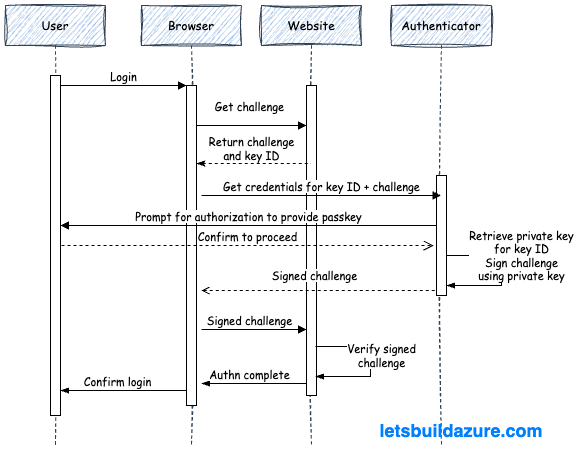
    The authentication process is similar to the registration ceremony, but uses information previously stored during registration:

    1. User Initiation: The user provides their username and triggers the authentication process.

    2. Service Challenge: The server returns a challenge (a cryptographic nonce) and key ID to the user’s device.

    2. Local Verification: The authenticator prompts the user for verification (biometric, PIN, etc.).

    3. Digital Signature: The authenticator then uses the stored private key (the one associated with the key ID) and signs the challenge, creating a unique signature.

    4. Server Validation: This signature is relayed to the server and the server uses the stored public key to verify the authenticity of the signature.

    This process is efficient, with reports indicating that passkey logins can be up to 70% faster than traditional password logins, significantly enhancing user experience.

    The rapid growth of passkey adoption is reshaping both consumer and enterprise authentication landscapes.

    Recent metrics indicate that over 15 billion passkey-enabled accounts exist globally, with significant uptake across major platforms. For instance, Google reports 800 million accounts utilizing passkeys, while Amazon has seen 175 million users adopt this technology within its first year of implementation.

    In the consumer sector, e-commerce leads the charge, with 42% of passkey usage attributed to improved checkout conversion rates. Air New Zealand experienced a 50% reduction in login abandonment after integrating passkeys, highlighting their effectiveness in enhancing user experience. Furthermore, Intuit has reported that 85% of its mobile authentications now occur via passkeys, underscoring a shift towards more secure and user-friendly authentication methods.

    A notable implementation of passkeys can be seen with CVS Health, which reported a 98% reduction in mobile account takeovers after adopting passkey technology. This dramatic decrease highlights the effectiveness of passkeys in mitigating security risks associated with traditional password systems.

    The enterprise sector is also witnessing a significant shift, with 87% of organizations now deploying passkeys. Key areas of focus include:

    Sensitive data access: 39% of enterprises prioritize securing sensitive information.

    Admin accounts: Another 39% emphasize protecting administrative access.

    Executive protection: 34% of organizations are focused on safeguarding executive accounts.

    Post-implementation statistics reveal substantial benefits:

    Lower Help Desk Costs: Organizations that adopt passkeys report a 77% reduction in help desk calls related to password issues. This not only saves costs but also enhances productivity by allowing IT teams to focus on more strategic initiatives.

    Long-Term Security Posture: As organizations increasingly adopt passkeys, they will benefit from a more secure authentication framework that is resilient against evolving cyber threats. This positions passkeys as a foundational element of future digital security strategies.

    Hybrid Deployment: Notably, 82% of enterprises are adopting hybrid deployments that combine device-bound and synced passkeys, reflecting a trend towards flexible security solutions.

    Passkeys vs. Traditional MFA: The Showdown

    Passkeys offer superior security and user experience compared to traditional multi-factor authentication (MFA).

    Defining Traditional MFA

    Before diving into a comparison of the of passkeys and MFA, let’s understand how MFA has been traditionally implemented.

    As the name implies, multi-factor authentication (MFA), involves authenticating with more than one factor…at least two factors (2FA):

    Something you know: This is your password or PIN

    Something you have: This is a physical device (like a smartphone or hardware token) and is the most popular second factor

    Something you are: These are biometrics (finger prints, facial recognition, voice recognition) – this is a touchy subject for data privacy advocates so tred cautiously and make sure you understand where these biometrics are being stored and processed.

    Simplifying Authn with Passkeys

    The net result of traditional MFA is a multi-step experience to authenticate. This can really annoy power-users trying to move fast and overwhelm the less technically capable. On the other hand, passkeys incorporate multiple factors (something you have and something your are) in a single transaction.

    Improved Security Posture

    MFA is not impervious to attacks. Recent years have seen several notable examples of MFA compromises, often exploiting human factors, technical weaknesses, or social engineering tactics.

    Cisco (2022): The Yanluowang ransomware group used MFA fatigue and voice phishing (vishing) to trick a Cisco employee into approving MFA requests. This allowed attackers to access Cisco’s corporate VPN and internal systems, leading to data theft and a ransomware threat. Reference

    Uber (2022): Attackers stole an Uber contractor’s credentials via malware on the contractor’s personal device, likely sold on the dark web. They then launched an MFA fatigue attack, repeatedly sending MFA approval requests until the contractor accepted one, granting access to multiple employee accounts. Reference

    Microsoft (2021-2022): The hacker group Lapsus$ used MFA fatigue attacks and social engineering to breach Microsoft’s internal systems, gaining access to employee and high-privilege accounts, including source code repositories for projects like Bing and Cortana. Reference

    **MGM Resorts (2023):** Attackers used social engineering to bypass MFA by calling the service desk and convincing agents to reset passwords without proper verification, enabling ransomware deployment. Reference

    SEC Twitter Accounts (2023): Attackers used SIM swapping to hijack phone numbers associated with accounts lacking MFA protection, then reset passwords to take control of official Twitter accounts. Reference

    How do they do this? There are several popular techniques:

    MFA Fatigue (MFA Bombing): Attackers flood users with repeated MFA approval requests, hoping to wear them down until they approve one. This tactic was used against Cisco, Uber, and Microsoft employees.

    Service Desk Social Engineering: Attackers impersonate users calling help desks to reset passwords or enroll new MFA devices, bypassing MFA protections.

    Adversary-in-the-Middle (AITM) Attacks: Phishing pages mimic legitimate login and MFA prompts, capturing credentials and MFA codes in real time to access accounts.

    Session Hijacking: Attackers steal session tokens or cookies after MFA authentication to maintain access without repeated MFA challenges.

    SIM Swapping: Criminals hijack phone numbers to intercept MFA codes sent via SMS or calls, as seen in attacks on SEC Twitter accounts.

    Malware and Endpoint Compromise: Malware on user devices can steal credentials or session tokens, enabling attackers to bypass MFA.

    **To be clear, I am not saying MFA should be dropped, but I am saying passkeys provide a more robust alternative**

    The Flip Side: Challenges and Limitations of Passkeys

    Implementing passkeys introduces significant challenges, particularly concerning device dependency and recovery risks. While passkeys enhance security and user experience, they also create new vulnerabilities that organizations must address.

    Device dependency is a primary concern. Passkeys are tied to specific devices, meaning that if a user loses their device or it becomes inoperable, they may lose access to their accounts. According to a report by FIDO, 43% of enterprises cite implementation complexity due to this device dependency, which complicates user access and recovery processes. Users must ensure they have backup devices or recovery methods in place, which can be cumbersome and may lead to frustration.

    Recovery risks are another critical issue. If all devices associated with a passkey are lost, users face the daunting task of account recovery. Unlike traditional passwords, which can often be reset through email or SMS verification, passkeys require a more complex recovery process. This can involve fallback protocols that may not be straightforward or user-friendly. For instance, if a user loses their primary device and does not have a secondary device set up for recovery, they may be locked out of their accounts entirely.

    Additionally, cross-platform compatibility poses challenges. While major platforms like Apple, Google, and Microsoft support passkeys, the implementation can vary significantly across different ecosystems. This inconsistency can lead to user confusion and hinder widespread adoption. Organizations must navigate these discrepancies to ensure a seamless user experience, which can be resource-intensive.

    Moreover, legacy systems present another barrier. Many enterprises still rely on traditional password systems, with 56% of organizations reporting continued password usage even after transitioning to passkeys. This inertia can slow down the adoption of passkeys and complicate the integration of new authentication methods.

    Looking Ahead: The Future of Passkeys in Authentication

    Passkeys are set to redefine digital security by addressing vulnerabilities inherent in traditional password systems. As organizations increasingly adopt passkeys, innovations are emerging that promise to enhance security and user experience further.

    The current landscape shows a significant shift towards passkey adoption, with 92.7% of devices now passkey-ready and enterprise deployments increasing by 14 percentage points since 2022. This growth is driven by the need for stronger security measures against phishing and credential theft, which account for 72% of breaches. The FIDO2 standard, which underpins passkey technology, is becoming the industry norm, pushing organizations to transition from legacy password systems.

    Upcoming Innovations in Passkey Technology

    1. **Decentralized Recovery Solutions**: Future innovations may include blockchain-based key escrow systems that allow users to recover their passkeys without relying on centralized services. This could mitigate risks associated with losing access to authenticated devices.

    2. **IoT Integration**: The FIDO Device Onboard specification aims to extend passkey functionality to Internet of Things (IoT) devices. This will enhance security across a broader range of devices, ensuring that smart home technologies and other connected devices can leverage the same robust authentication methods.

    3. **Quantum Resistance**: As quantum computing advances, the need for post-quantum cryptographic algorithms becomes critical. Future passkey implementations may incorporate these algorithms to safeguard against potential quantum attacks, ensuring long-term security.

    4. **Enhanced User Experience**: Innovations will likely focus on streamlining the user experience further. For instance, integrating biometric authentication seamlessly into everyday devices can reduce friction while maintaining high security.

    5. **Cross-Platform Compatibility**: As passkeys gain traction, efforts to standardize their implementation across different platforms (Apple, Google, Microsoft) will be crucial. This will facilitate smoother transitions for users and organizations adopting passkey technology.

    In Conclusion: Embracing the Passkey Revolution

    The transition to passkeys marks a pivotal moment in digital security, offering a robust alternative to traditional passwords. Passkeys leverage public key cryptography, providing enhanced phishing resistance and a streamlined user experience. With over 15 billion passkey-enabled accounts globally, organizations are witnessing significant improvements in security metrics and user satisfaction.

    Factor Passkeys Traditional Passwords
    Phishing resistance ✅ Native, origin-bound ❌ Vulnerable to phishing
    Sign-in success rate 98% 32%
    User experience Faster logins, reduced cognitive load Slower, requires password management

    As the adoption of passkeys continues to grow, organizations should prioritize their implementation to enhance security and improve user engagement. Embracing this technology is not just a trend; it is a necessary step towards a more secure digital future.

    As the adoption of passkeys continues to surge, challenges remain, including device dependency and recovery risks. However, the trajectory indicates a strong shift towards passkeys as the standard for secure digital identity. With ongoing innovations and increasing regulatory pressures, the future of authentication is likely to be dominated by passkeys, offering both enhanced security and improved user experiences.

  • Making AI Assistants More Capable with Model Context Protocol (MCP)

    TL;DR

    The Model Context Protocol (MCP) is an open-source standard that simplifies integrating AI assistants with tools (the things AI assistants use to perform actions) and data sources (the locations AI assistants go to for information).  With so much momentum behind it, MCP is poised to become the standard for AI-to-tool interactions; paving the way for more intelligent and responsive AI applications.

    This article expands on these capabilities with an concrete example of a food ordering AI assistant.

    – Model Context is the surrounding information — like conversation history, user preferences, goals, and external data — that AI models use to generate more relevant and coherent responses.

    – Model Context Protocol (MCP) is a standard that helps AI agents efficiently interact with data sources and external tools without needing a custom integration for every single one.

    – Without MCP, building AI agents requires tedious, high-maintenance integrations. MCP streamlines this by creating reusable connections across apps and data.

    – Challenges remain: MCP still has issues with authentication, security (blind trust risks), cost control (token usage), and protecting sensitive data.

    MCP isn’t perfect yet, but it’s a big step toward more powerful, context-aware AI systems that are easier and faster to build.

    1. TL;DR
    2. What is Model Context?
    3. How Does MCP Help? A Real-World Example
      1. Situation and Background
      2. No AI Agent – A Familiar Flow
      3. AI Agent Doing the Work
      4. How MCP Helps You Build Agents More Effeciently
      5. Avoiding the MxN Integration Problem
    4. Are You Saying Framework Tools Are Bad?
      1. That Settles It, MCP Will Take on the World
      2. Authentication and Authorization (authn/authz)
      3. Blind Trust
      4. Lack of Cost Controls
      5. Unwitting Data Exposure
    5. In Conclusion: Do Not Ignore MCP

    What is Model Context?

    Before nerding out on the protocol itself, let’s understand what context is and how it applies to different AI models with different modalities (ex. language models, vision models, audio models, or models that support more than one of these modalities).

    According to Merriam-Webster, context is “the parts of a discourse that surround a word or passage and can throw light on its meaning” or “the interrelated conditions in which something exists or occurs.”

    In the world of AI, this translates to the surrounding information—textual, visual, auditory, or situational—that informs and shapes the model’s response. Each model type uses context in different ways depending on the modality and the problem being solved. 

    Model context is the information a language model uses to understand the user’s intentions and provide relevant, coherent responses. This includes:

    Conversation History: Previous prompts and responses.

    User Preferences: Style, tone, depth of answers.

    Task Goals: Long-term objectives and/or short-term instructions.

    External Data Repositories: Files, websites, document libraries, or other repositories.

    How Does MCP Help? A Real-World Example

    The Model Context Protocol (MCP) unifies how AI systems perform actions and interacts with data repositories.

    Let’s walk through a real-world example so you can understand where exactly MCP fits in. First, I’ll walk through the process without AI, then I’ll talk through the process with an AI agent.

    Situation and Background

    For this example, let’s assume your planning dinner for you and a friend. It’s been a while since you’ve eaten at your favorite Indian restaurant. Chicken tikka, rice, and naan bread are your go-to dishes there, but you know that won’t be enough for the both of you, so you’ll need to figure out another dish when you get there…on second thought, you want delivery and, being a digital native, you’ll place your order online (DoorDash, GrubHub, UberEats, etc.) to arrive by 6:30p.

    No AI Agent – A Familiar Flow

    Without an AI agent, you’ll go through a process similar to below:

    1. Log into your preferred food delivery service

    2. Search for the restaurant.

    3. Add your favorite items to the cart

    4. Examine comments and reviews about the restuarant to figure out other popular dishes

    5. Select a dish with positive reviews (samosas!)

    6. Set time for delivery and complete check-out

    Many things happen behind the scenes, we won’t focus on how those processes may or many not leverage AI, and food arrives before you get “hangry”.

    AI Agent Doing the Work

    If you had a full-blown agent, something similar to the above would happen based on a single command:

    “Order food from my favorite Indian restuarant. Get my usual items and surprise me with a popular dish. I need the food delivered to my house by 6:30p”

    The agent will then perform roughly the following sequence:

    1. Think about the set of actions requried to fulfilled the request

    2. Determine it needs to more context (ex. what is your favorite Indian resturant? what do you typically order there?)

    3. (data) Examine chat history and personal preferences to determine your favorite restuarant: Tandoori Oven

    4. (data) Examine chat history and personal preferences to determine your home address

    5. (data) Examine chat history and personal preferences to determine your preferred food delivery service

    6. (data) Examine your order history to determine what you typically order: chicken tikka, rice, garlic naan

    7. (data) Examine reviews of the restuarant to see what is popular: samosas

    8. (tools) Add items to cart

    9. (human in the looop) Confirm the order before placing it

    10. (tools) Checkout and set delivery to your house by 6:30p

    I intentionally tagged the steps where the agent is accessing data and using tools; it’s these steps that can leverage MCP…let’s see how.

    How MCP Helps You Build Agents More Effeciently

    What if you were tasked with making the above agent? How would you build it?

    It’s very possible to create the above agent without using MCP at all. Many of the popular agentic frameworks include an inventory of built-in “tools” (or sometimes called “functions” or “skills”) that improve memory management and allow models to interact with external services.

    * LangChain/LangGraph

    * Autogen

    * Crew.ai

    * OpenAI Swarm

    * Hugging Face Transformers Agents

    * etc.

    At time of this writing, none of those frameworks provide the capability to interact with any of the food delivery services (DoorDash, GrubHub, UberEats, etc.)…sure you could design things to interact with those sites using a browser (ex. BrowserUse) but the results won’t be as concise and you may want (and it’s a lot more testing and debugging).

    What about building a custom tool for the framework?

    You could examine the APIs these delivery services provide and create a custom tool (you could even use AI itself to build this tool)…but don’t underestimate the ongoing testing and maintenance required to accomodate changes to the APIs (which will certainly change over time).

    Avoiding the MxN Integration Problem

    The above quandry about creating a custom tool is a major motive for MCP’s introduction.

    “M” AI applications need to connect to “N” data sources, leading to an exponential increase in custom integrations (MxN).

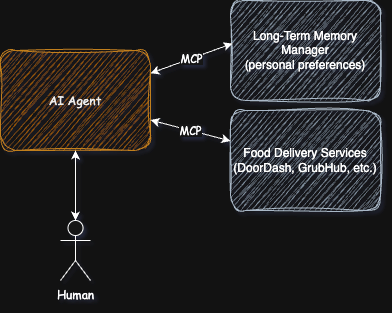
    However, if there was an MCP server that knows how to manage your personal preferences and one that interacts with the food delivery services, it sure would simplify the process…and reduce maintenance.

    Are You Saying Framework Tools Are Bad?

    No, built-in tools will always have a place. They can be tuned for speed and token reduction (less back and forth chatter). But, as MCP implementations become more prevalent and mainstream (not just side-projects but actual vendor supported services) you’ll see a shift from framework based tools towards MCP based designs.

    That Settles It, MCP Will Take on the World

    Not yet, there are still some shortcomings that the MCP specification needs to work through.

    Authentication and Authorization (authn/authz)

    In the above example, I glossed over the fact that the AI agent needs to interact with the food delivery services as you…the person with the account and payment information. The initial revision of the MCP spec didn’t address this. Now that they have, there are still some shortcomings to the design (which Christian Posta dives into details on)

    Blind Trust

    Many of the MCP server implementations are susepetible to command injection vulnerabilities. If you are only consuming these servers (not creating them) it’s not a major concern right? Until you find yourself running those servers locally (on your laptop or cloud machines) and you see the agent is taking harmful actions (whether intentionally or just because it’s spiraling down the wrong course of thinking).

    Lack of Cost Controls

    The quality of MCP servers vary and, unlike custom tools, it’s easy for the server developer to return large amounts of text in responses. During the course of a dialog between the model and the server, the history of the text can add up (resulting in large token consumptions and larger costs for agent execution)

    Unwitting Data Exposure

    Similar to the Blind Trust problem, and related to the authn/authz shortcomings, an MCP server implementation may return data that you (and the agent acting on your behalf) shouldn’t have access too.

    In Conclusion: Do Not Ignore MCP

    Model Context Protocol (MCP) isn’t a magic wand that instantly solves every challenge in building smarter, more capable agents — but it is a major leap forward. By standardizing how models interact with data and tools, MCP drastically reduces the complexity of integrations and helps avoid the dreaded MxN problem.

    As MCP matures, expect to see faster development cycles, better interoperability between AI systems, and a shift toward more modular, maintainable designs. But, as we explored, MCP isn’t without its growing pains: security concerns, cost management, and responsible data access will remain critical issues for practitioners and vendors to address.

    The bottom line? MCP is setting the foundation for a new era of AI agents — one where context is richer, actions are more reliable, and developers spend more time building value and less time gluing systems together. Stay curious, stay cautious, and get ready: the next wave of AI innovation is just getting started.

  • Chain of Thought Prompting

    TL;DR

    Chain-of-Thought (CoT) prompting is a technique that enhances reasoning in large language models by guiding them to generate intermediate logical steps before providing final answers. It’s most effective for complex tasks requiring multi-step reasoning, particularly in models with over 100 billion parameters. Use CoT when dealing with mathematical problems, symbolic manipulation, or complex reasoning tasks where step-by-step thinking would be beneficial. Learn more.

    1. TL;DR
    2. What is Chain-of-Thought Prompting
    3. Key Benefits
      1. Enhanced Reasoning Capabilities
      2. Performance Improvements
    4. Research Findings
      1. Effectiveness Factors
      2. Notable Results
    5. Best Practices
      1. Implementation Guidelines
      2. Limitations

    What is Chain-of-Thought Prompting

    Chain-of-Thought prompting works by providing examples that demonstrate explicit reasoning steps, encouraging the model to break down complex problems into manageable intermediate steps. Unlike traditional prompting that seeks direct answers, CoT guides the model through a logical thought process, making it particularly effective for tasks requiring structured thinking. Learn more.

    Key Benefits

    Enhanced Reasoning Capabilities

      • Allows models to decompose multi-step problems into intermediate steps
      • Provides interpretable insights into the model’s reasoning process
      • Enables additional computation allocation for more complex problems. Learn more.

      Performance Improvements

      • Significantly improves accuracy on arithmetic reasoning tasks
      • Enhances performance on commonsense reasoning problems
      • Facilitates better symbolic manipulation. Learn more.

        Research Findings

        Effectiveness Factors

        • Performance gains are proportional to model size, with optimal results in models of ∼100B parameters[1]
        • The specific symbols used in prompts don’t significantly impact performance, but consistent patterns and web-style text are crucial[2]
        • Complex examples with longer reasoning chains tend to produce better results than simpler ones[5]

        Notable Results

        • Achieved state-of-the-art accuracy on the GSM8K benchmark of math word problems using just eight CoT exemplars[3]
        • Demonstrated improved performance across arithmetic, commonsense, and symbolic reasoning tasks[6]
        • Shows particular strength in mathematical and symbolic reasoning tasks, though benefits may vary in other domains[4]

          Best Practices

          Implementation Guidelines

          • Use detailed, step-by-step reasoning examples in prompts
          • Focus on complex examples that showcase multiple reasoning steps=
          • Maintain consistent patterns in example structure[5]

            Limitations

            • May not be effective with smaller language models
            • Benefits primarily concentrated in specific types of reasoning tasks
            • Performance improvements may vary depending on the task type[4]

              Citations:

              [1] https://learnprompting.org/docs/intermediate/chain_of_thought

              [2] https://openreview.net/forum?id=va7nzRsbA4

              [3] https://openreview.net/forum?id=_VjQlMeSB_J

              [4] https://arxiv.org/html/2410.21333v1

              [5] https://learnprompting.org/docs/advanced/thought_generation/complexity_based_prompting

              [6] https://arxiv.org/abs/2201.11903

              [7] https://openreview.net/pdf?id=_VjQlMeSB_J

              [8] https://arxiv.org/pdf/2201.11903.pdf

            • GitHub Copilot for Azure: How It Helps AKS Admins

              TL;DR

              GitHub Copilot for Azure is now in public preview.  I was given early access and have been using it for a few months already. It has surprised me in many ways and disappointed me in others.

              When it comes to Azure Kubernetes Service (AKS) administrative tasks, the extension clearly earns “navigator” title; but don’t rely on it to take action in the same way a pilot would depend on a “copilot” (at least not yet).

              This article includes a summary of things that exceeded expectations, met expectations, and left me wanting more when it comes to AKS administrative tasks. Give it a review to see how it may inspire you with better prompts or to perform other actions.

              What worked well?

              • Summarize trade-offs between AKS and a self-managed Kubernetes cluster
              • Explain motivations to use service-mesh
              • Create AKS cluster for development
              • Describe quota adjustments required to deploy an AKS cluster in your subscription
              • Locate a sample application to deploy to AKS cluster
              • Create Helm Chart from collection of YAML Manifests

              What did not work so well?

              • Adjust CPU quotas to deploy an AKS cluster
              • Deploy the sample application
              • Analyze health of a service running on my AKS cluster
              • Enable Istio service mesh on the cluster
              • Generate kubeconfig to connect to my cluster
              1. TL;DR
                1. What worked well?
                2. What did not work so well?
              2. What is GitHub Copilot for Azure anayways?
              3. How to Setup The Extension
              4. (Not So) Hypothetical Scenarios
                1. Exploring Topics
                  1. @azure How does the management and maintenance differ between AKS and a self-managed Kubernetes cluster?
                  2. @azure What are the motivators of service mesh and why would I enable it on my AKS cluster?
                  3. @azure What are the specific prerequisites for deploying an AKS cluster in the eastus2 region?
                2. Deploy Something to Get Hands-On
                  1. @azure create an AKS cluster
                  2. @azure I am receiving the below error when deploying and AKS cluster. Which quotas do I need to increase?
                  3. @azure what quota setting do these VM skus belong to?
                  4. @azure increase cpu quota in the eastus2 region for standard_d4ds_v5?
                  5. @azure does my subscription meet the prerequisites for deploying and AKS cluster to eastus2 region?
                  6. @azure Can you find a sample app that consist of multiple micro-services to deploy to AKS?
                  7. @azure deploy this app to Azure
                  8. @azure deploy this manifest to my aks cluster
                3. Examining Health of Deployed Services
                  1. @azure how is the health of the order-service on my aks cluster named copilot?
                4. Let’s Setup Service Mesh
                  1. @azure enable istio on my aks cluster named “copilot”
                  2. @azure generate kubeconfig connecting to my AKS cluster named “copilot”
                5. Phone a Friend
                  1. Convert these yaml manifest files into a helm chart

              What is GitHub Copilot for Azure anayways?

              This extension to GitHub Copilot allows you to perform a range of Azure activities, directly within VS Code

              • Learn – Chat with expert assistants tuned on Azure topics, training, and documentation.
              • Deploy – Update and create resources; locate and provision solution accelerators.
              • Review – Query your Azure resources using plain English.
              • Diagnose – Navigate and interpret logs to understand the problem.

              How to Setup The Extension

              For full details on how to get yourself going with this extension, and even execute some of these prompts, see my article GitHub Copilot for Azure: The End-to-End Setup Process

              (Not So) Hypothetical Scenarios

              I’ve been using this extension for a lot of different things in recent months. It’s helpful, but you still need to know what you want to do and perform a lot of the actions yourself.

              Exploring Topics

              The GitHub Copilot for Azure extension does a good job explaining Kubernetes concepts, AKS specific things, and reiterating best-practice guidance. This is a huge help when you’re completely new or if you are well-versed, but just can’t find the right words.

              @azure How does the management and maintenance differ between AKS and a self-managed Kubernetes cluster?

              Great explanation!

              @azure What are the motivators of service mesh and why would I enable it on my AKS cluster?

              Another good answer and helpful links to additional reference material.

              @azure What are the specific prerequisites for deploying an AKS cluster in the eastus2 region?

              Provides general guidance, but nothing particularly actionable or tactful.

              Deploy Something to Get Hands-On

              At this point, I wanted to go from discussion and theory to get something actually running.

              @azure create an AKS cluster

              This launched a nice experience to deploy an basic AKS cluster using the AKS extension for VSCode. Unfortunately, the process failed due to CPU quota restrictions (a common problem I was hoping the prompt about pre-requisites would have made clear).

              @azure I am receiving the below error when deploying and AKS cluster. Which quotas do I need to increase?

              Invalid template: BadRequest: Preflight validation check for resource(s) for container service copilot made this in resource group aks-rg failed. Message: AKS Automatic could not find a suitable VM size. The subscription may not have the required quota of '16' vCPUs, may have restrictions, or location 'eastus2' may not support three availability zones for the following VM sizes: 'standard_d4pds_v5,standard_d4lds_v5,standard_d4ads_v5,standard_d4ds_v5,standard_d4d_v5,standard_d4d_v4,standard_ds3_v2,standard_ds12_v2'.

              Quotas can be confusing. The concept is easy to understand, but when you get into the details about the different SKU families and regions, it can be daunting. The response was pretty vague, so I decided to press the issue further…

              @azure what quota setting do these VM skus belong to?

              standard_d4pds_v5
              standard_d4lds_v5
              standard_d4ads_v5
              standard_d4ds_v5
              standard_d4d_v5
              standard_d4d_v4
              standard_ds3_v2
              standard_ds12_v2

              The response reiterated the vCPUs and memory for each of those models, but it wasn’t quite what I was hoping for.

              @azure increase cpu quota in the eastus2 region for standard_d4ds_v5?

              Building on the response from the prior question, I was expecting the extension to actually submit the quota increase request for me. Unfortunately, I was provided with a CLI command I could run to examine the quotas and link to external documents that provided instructions on how to navigate the quota increase process. I then made the quota increases myself and decided to give the extension another chance to prove itself.

              @azure does my subscription meet the prerequisites for deploying and AKS cluster to eastus2 region?

              Disappointing response here. Basically I was told there was no existing AKS cluster in the subscription. Well I knew that! This whole journey started because I wanted to create a cluster.

              When all was said and done, I relaunched the AKS Extension in VSCode and worked through the wizard to create my cluster.

              @azure Can you find a sample app that consist of multiple micro-services to deploy to AKS?

              Copilot located the example Azure-Samples/aks-store-demo: Sample microservices app for AKS demos, tutorials, and experiments and provided azd commands for me to run to easily initialize workspace.

              The “human in the loop” strategy that is popular with AI Assistants would have prompted me to confirm action and then proceeded. In this case, no such prompt so I used the “Insert into Terminal” feature to run the recommended commands myself.

              Once the workspace was initialized with the sample application…

              @azure deploy this app to Azure

              Not the response I was hoping for. I was given links to different online instructions for deploying the application…but I noticed a template spec yaml and opened that in my editor.

              @azure deploy this manifest to my aks cluster

              This worked out well. It launched wizard and I deployed aks-store-quickstart.yaml

              Examining Health of Deployed Services

              With the services defined in the manifest now deployed, I wanted to see what kind of help Copilot could provide for diagnosing problems.

              @azure how is the health of the order-service on my aks cluster named copilot?

              This resulting in some recommended kubectl commands. No execution of those commands and no interpretation of the results. Very helpful for those unfamiliar with kubectl.

              A major benefit of AKS is you can examine the cluster configuration through the Azure portal (assuming the cluster management plane is exposed to the internet). That is much more user friendly than kubectl from the command line and I would have expected a “head-nod” to these capabilities…but no mention.

              Let’s Setup Service Mesh

              With the AKS cluster running and a sample collection of services deployed, I wanted to take advantage of the benefits that “service mesh” promised during my prior testing.

              @azure enable istio on my aks cluster named “copilot”

              This returned instructions how install Istio, but did not take an action or prompt me to confirm action. I was actually surprised that the response did not reference the Istio add-on for AKS: Deploy Istio-based service mesh add-on for Azure Kubernetes Service – Azure Kubernetes Service | Microsoft Learn

              Regardless, I decided to proceed with the instructions provided (which basically explained how to deploy Istio via Helm charts).

              First things first…I need to connect to the cluster.

              @azure generate kubeconfig connecting to my AKS cluster named “copilot”

              At this point, I was not disappointed. My expectations for Copilot to take action where minimal. The response provided az cli command to run (and it worked flawlessly)

              az aks get-credentials --resource-group aks-rg --name copilot

              Then I completed the Istio deployment sequence previously described without problems.

              Phone a Friend

              An engineer on the team was having trouble managing a complex suite of services in their cluster (YAML manifest overload). Not deeply familiar with Helm syntax myself, I decided to see how Copilot could help.

              Convert these yaml manifest files into a helm chart

              I was very pleased with the results! This is definitely a scenario to keep in mind and save hours of work. The content was automatically generated, placed in my editors, and I saved the files in my workspace.

              Of course, we tested it out and things ran….helm deploy with success.