Category: Enterprise Patterns

  • Handle MSFT’s MFA Mandate With Confidence

    TL;DR

    You can mess up your entire company if you hastily react to Microsoft’s mandate for multifactor authentication (MFA). If you aren’t ready by October 15, 2024:

    But is this really required? “Yes…there are no exceptions” per the Mandatory MFA FAQs
    1. TL;DR
    2. This Is Just the Beginning
      1. Phase 1 Impact
      2. Phase 2 Impact
    3. What is an Entra tenant?
    4. Which Kind of Accounts are Impacted?
      1. Member and Guest User Accounts
      2. Shared Accounts
      3. Service Accounts
      4. “Break Glass” Accounts
    5. Which Kind of Accounts are Not Impacted?
      1. Service Principals, App Registrations, and Enterprise Apps
      2. Managed Identities
    6. But How Do I Address Potential Problems
      1. Service Accounts
      2. “Break Glass” Account
      3. Member and Guest Accounts
    7. In Closing

    This Is Just the Beginning

    I suspect somebody at Microsoft was fed up with being blamed for breaches caused by customers misconfiguring their own environments. The MFA requirement is one of several “best practices” that MSFT is now requiring all customers adhere to. For another example, see my post about private subnets.

    No more Mr. Niceguy…but it really is for you own good
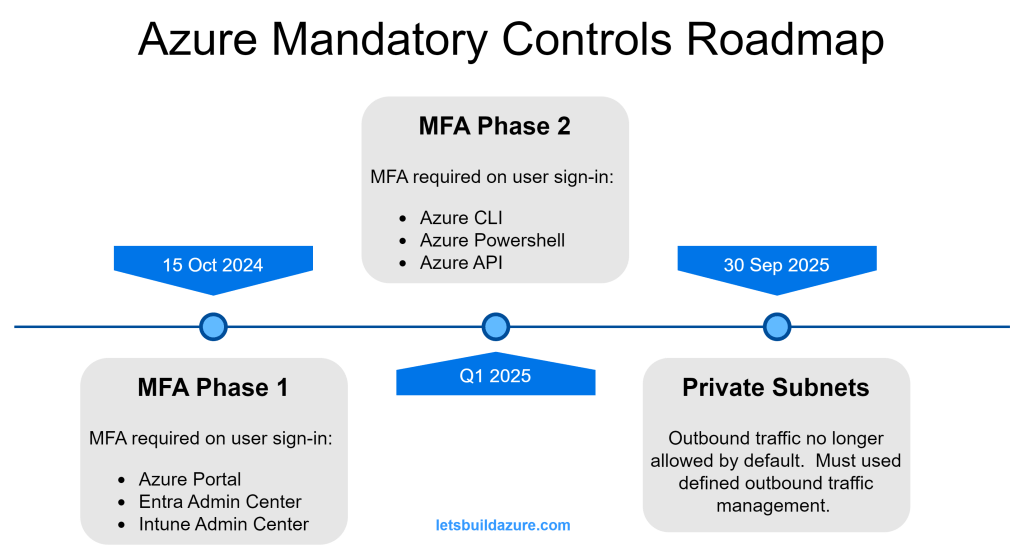
    The MFA mandate is spread across multiple phases (two announced so far, but you should expect more). Phase 1 and Phase 2 impacts power-users (admins, cloud developers, etc.); everyday users don’t use these services and will not be impacted by Phase 1 or Phase 2 mandate.

    Phase 1 Impact

    Phase 2 Impact

    • Azure CLI
    • Azure Powershell
    • Azure API clients (like Terraform)

    Congratulations! if you use any of the above services, you are a power-user (even if you just have Reader permissions).

    What is an Entra tenant?

    Not sure what an Entra tenant is? All Microsoft cloud products are tied to a tenant. If your company uses any of these clouds, they have at least one tenant.

    • Azure cloud (and Azure DevOps)
    • M365 (Office, Teams, Sharepoint, OneDrive, Intune, etc.)
    • D365 (CRM, ERP)
    • Power Platform (Power BI, Power Apps, etc.).

    According to Bing Copilot…”describe an Entra tenant to me”

    A Microsoft Entra tenant is essentially a dedicated instance of Microsoft Entra ID (formerly Azure Active Directory) that an organization uses to manage its users, groups, and resources. Here are some key aspects:

    • Identity Management: It provides a centralized platform for managing user identities, including employees, partners, and customers.
    • Access Control: Entra tenants allow you to control access to applications and resources through policies and role-based access control (RBAC).
    • Security: Features like multi-factor authentication (MFA), conditional access policies, and identity protection help secure user accounts and data.
    • Collaboration: Supports B2B collaboration by allowing guest users from other organizations to access resources securely.
    • Integration: Can be integrated with various identity providers and applications to streamline authentication and single sign-on (SSO).

    Which Kind of Accounts are Impacted?

    Member and Guest User Accounts

    This mandate applies to all “user” accounts in your Entra tenants, regardless of type.

    Member accounts are user identities that belong to the Entra tenant. These accounts are “homed” to the Entra tenant they are a member of. It’s common to setup synchronization between your on-prem Active Directory using Entra Connect. Accounts created by this synchronization are considered Member accounts.

    Guest accounts are external user identities registered with the Azure tenant. It is very common to setup a B2B trust between your Entra tenant and a third party’s trusted identity provider (IdP). Guest accounts may be “homed” in another Azure tenant or they may be “homed” in a completely separate IdP platform (such as Okta or Ping Federate).

    Shared Accounts

    With the exception of “break glass” accounts, discussed later, this is not a recommended practice.

    User accounts should be assigned to individuals only…but the reality is there are common accounts used by a group or team that shares the credentials. This brings a problem of reduced traceability and individual accountability.

    This mandate applies to shared accounts (since they are really just “user” accounts assumed by multiple individuals).

    Service Accounts

    The term “service account” is not the same as a Service Principal (which is discussed later). I am using “service account” to describe those situations where you have automated processes interacting with Entra, Azure, or other Microsoft Cloud apps as a “User”.

    Like all User accounts, service accounts will be impacted.

    “Break Glass” Accounts

    Break glass accounts are Member accounts with tightly managed credentials. Similar to a shared accounts, the credentials of a “break glass” account are shared amongst a small group or team. Unlike shared accounts, the “break glass” account is only used in emergency situations – they are critical to prevent you from getting locked out of your tenant.

    These accounts are subject to the same MFA requirement as all other User accounts.

    Which Kind of Accounts are Not Impacted?

    Service Principals, App Registrations, and Enterprise Apps

    These three entities are often confused. When you setup an App Registration or an Enterprise App, an associated Service Principal is created in your Entra tenant. The Service Principal is the identity that the App Reg or Enterprise App uses when interacting with your tenant, Azure resources, or other Microsoft Cloud elements.

    To make a long story short, Service Principals are not impacted by this mandate; neither are the App Registrations nor the Enterprise Apps.

    Managed Identities

    Managed identities are very similar to Service Principals, but they can only be used by workloads running in Azure. Behind the scenes, Managed Identities have a Service Principle but, unlike a Service Principle, you do not control the authentication keys and certificates used by these non-human identities (they are managed by Microsoft).

    Managed identities are not impacted by this mandate.

    But How Do I Address Potential Problems

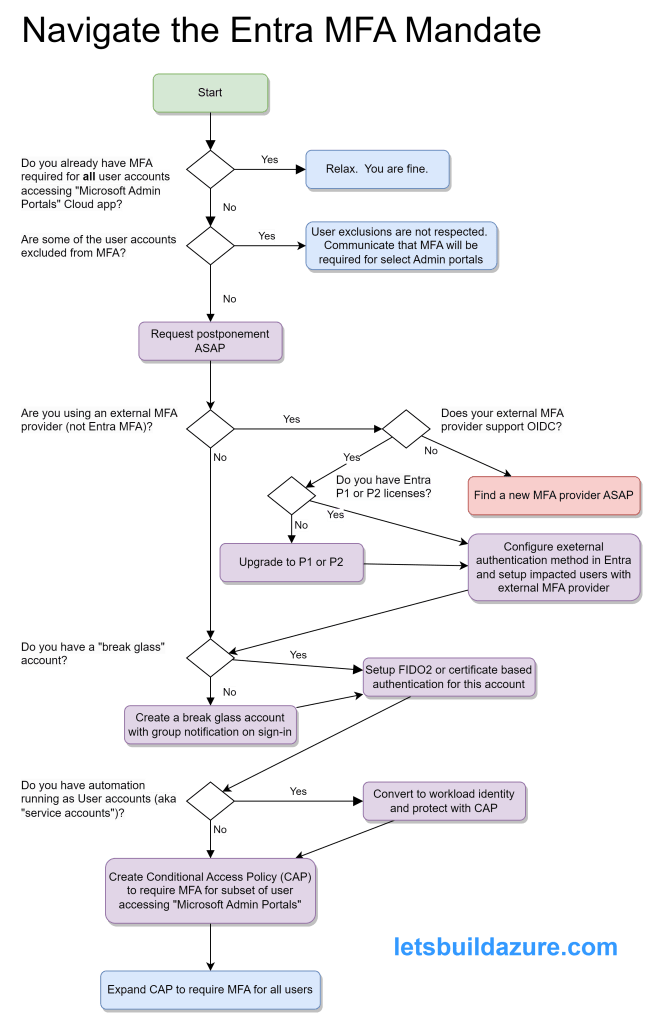
    Mandatory Microsoft Entra multifactor authentication (MFA) – Microsoft Entra ID | Microsoft Learn provides good guidance on the actions to prepare for mandatory MFA. I am summarizing points from that article here.

    Service Accounts

    If you know about specific service accounts in use, migration them to use a workload identity (a Service Principal or Managed Identity) so you secure your cloud-based service accounts.

    Entra sign-in logs can help you identify the service accounts failing MFA and the Export-MSIDAzureMfaReport generates a helpful report to see which accounts are not using MFA. Once you have enabled the MFA CAP, you’ll quickly see which accounts are repeatedly failing the MFA criteria.

    Don’t feel too bad if some of the automation using these accounts temporarily breaks – it should have never been setup like this to begin with.

    “Break Glass” Account

    Microsoft Authenticator is not an ideal method for MFA of this kind of account because you can only associate it with one phone. When problems occur, you don’t want to depend on a single individual to log in.

    For smaller organizations, you can create separate break glass accounts for each individual and they can register their own phone.

    But for larger organizations, this can be unwieldy so enable FIDO2 passkeys for your organization and get the various individuals that may need to use this account setup BEFORE you create a Conditional Access Policy requiring MFA. Certificate-based authentication is another method to setup multiple individuals with MFA ability using the break glass account.

    Regardless of the approach (individual break glass accounts or a shared account) it’s important to monitor sign-in and audit logs so you’re alerted whenever one of the break-glass accounts is used. This alert can be email and/or SMS and/or Team message (or all of those). These are powerful accounts and you want to watch them closely.

    Member and Guest Accounts

    If you don’t plan on using one of the Entra’s built-in MFA methods then you need to configure an external authentication method.

    Entra Conditional Access Policies (CAPs) are very powerful but also rather straight-forward. You can configure a wide variety of criteria to secure your tenant and the cloud applications using your tenant for authentication.

    At a minimum, you should create a CAP requiring MFA for anybody accessing the Cloud app “Microsoft Admin Portals” – this covers more than the Phase 1 applications that require MFA, but if you are going through this process, you might as well get ahead of the curve.

    It’s a good practice to Exclude certain users or groups when you create a new CAP – this prevents you from locking yourself out if something was misconfigured. Be sure to include some of the other Entra admins in this CAP so they can test their access.

    Review the Entra sign-in logs to of somebody involved in the test to ensure the MFA CAP was applied to their sign-in attempt. Once verified, you can remove yourself from the exclusion.

    In Closing

    Over and over again, MFA is a proven method to improve your security posture. Ideally, you implement MFA for all of your cloud apps, but Microsoft is leaving you no choice but to implement MFA for the sensitive admin apps used to manage a variety of their popular cloud based services.

    More details to come around the changes required to handle potential problems with the Phase 2 changes. Implement the changes described in this article and you’ll have much less to worry about when that time comes.

  • Private Subnets: Don’t Let Your VM Get Trapped

    TL;DR

    Starting September 30, 2025, your VMs will be blocked from the public Internet, unless you have outbound controls in place. This means:

    • no pulling updates from public package repositories
    • no pulling containers from public registries
    • no pushing telemetry to monitoring tools
    • no making calls to third-party APIs
    • etc., etc.

    Avoid this surprise. Understand your options and the trade-offs between them.

    1. TL;DR
    2. In The Name of Security
    3. Analogy to Pull It All Together
    4. What About Network Security Groups (NSGs)?
    5. Import Networking Concepts
      1. Hub-and-Spoke Will Avoid Headaches
        1. Dive Deeper into Hub and Spoke
      2. Source Address Network Translation (SNAT)
        1. Dive Deeper into SNAT
    6. Give Me Some Options Already
      1. Virtual Appliance/Firewall (My Preference)
      2. NAT Gateway
        1. Dive Deeper into NAT Gateway
      3. Public Load Balancer with Outbound Rules
        1. Dive Deeper into Public Load Balancer
      4. Instance Level Public IP Address
    7. In Closing

    In The Name of Security

    Outbound by default is a security risk. Zero trust means you don’t trust anything by default – including egress traffic. Endpoint detect and respond (EDR) technologies and eXtended Detect and Response (XDR) technologies, such as Defender for Endpoint, are not perfect. Zero-day exploits leave your machine vulnerable, even if you diligently apply the latest security patches.

    The defense in depth mindset means you have multiple layers of controls to prevent attacks and data exfiltration. Managing egress traffic adds controls to the network layer (above and beyond controls you have on the VM itself).

    As a relevant example of defense in depth, assume you are managing an API only intended for trusted third parties. There are many ways to implement authentication and authorization between clients connecting to your API and the services handling those requests (access tokens, OAuth, mutual-TLS, etc.). If you know the IPs of clients accessing your API, additional depth can be added to your defenses with source IP restrictions. If source IP(s) of the trusted party are known and consistent, you can add more layers of depth to your defenses with source IP restrictions. This creates a situation where APIs are only access by a known location (the IP address) using a proven identity (the authentication process).

    Analogy to Pull It All Together

    I love using analogies to explain technical concepts. I’ll be referring to an analogy when explaining concepts in this article.

    Consider a sensitive government research facility at an undisclosed location with strict policies for sending communication packages. Assume your VM is an analyst communicating with an affiliate in a different country. There is a certain amount of trust between the two countries, but the sensitive nature of things does not allow blind trust between the two (packages are not allow to flow freely between the two).

    How will the request and response packages between these two affiliates be managed? Keep reading…

    What About Network Security Groups (NSGs)?

    NSGs allow you to define network layer controls for specific subnets and/or network cards (NICs). You can specify acceptable inbound and outbound IP address and port combinations.

    NSGs compliment how you manage outbound traffic, but they are not involved in sending the packets to the public Internet.

    To explain in the analogy, the department supervisor acts like a NIC level NSG and applies criteria to determine the analyst’s outbound package is going to an acceptable destination. The package is then handed to the facility supervisor that acts like a Subnet NSG. Using their own criteria, the facility supervisor also makes sure the package is going to an acceptable destination.

    At this point, the facility supervisor hands the package to a courier. The courier ensures the package (which is going to a different country) is marked in a way that responses can be returned, without exposing the origin of the package (which is the undisclosed facility).

    While the department supervisor and facility supervisor act like NSGs, the courier plays a very different function and is not an NSG. This article focuses on the different ways to setup couriers.

    Import Networking Concepts

    Before jumping into the design options, it’s worth taking a moment to clarify a few applicable networking concepts. If you want to dive further into these, I’ve included links to articles I’ve found helpful.

    Hub-and-Spoke Will Avoid Headaches

    An ounce of prevention is worth a pound of treatment

    Weathered old wagon wheel on a freight wagon.

    Using hub-and-spoke design can dramatically simplify how you solve the dilemma private subnets introduce.

    It’s rare to see an entire application landscape (both Production and Non-Production environments) running within a single VNET. At a minimum, you want to have a Production and Non-Production environment for each application and those should be in a separate VNET.

    I totally understand you can technically put all the environments for your application(s) is a single VNET; however, it reflects low operational maturity. This typically implies the team doing development has full-access to the production environments, not to mention you are exposed to lateral movement by an attacker.

    Moreover, if you’re putting both Production and Non-Production environments in the same VNET, it complicated access controls and will be near impossible to pass a compliance audit for standards like: SOC2, ISO27001, HIPAA/HITRUST, or NIST 800-53!

    With that said, it is also very common for an application to communicate with other applications/services that are not exposed to the public Internet. These applications/services may be running in:

    • other Azure VNETs
    • other public clouds
    • other private clouds
    • other on-premise datacenters

    Regardless of which specific scenario, “hub-and-spoke topology” is a tried-and-true scalable design to manage private network traffic flows between these services and public Internet egress.

    Explained in simplest terms, individual VNETs are peered with a single common VNET. If you diagram it out, this looks like a wagon wheel, the common VNET is the hub (connected to the axel) and the spokes span outward.

    The hub network acts as a common point for communication that passes outside a spoke VNET (whether the destination is the Internet, a different spoke peered to the hub, a spoke peered to a different hub, or somewhere on the other end of a VPN or ExpressRoute connection).

    Dive Deeper into Hub and Spoke

    Hub-and-spoke topologies can be implemented through structured VNET peering, Azure VWAN service, or the Azure Virtual Network Manager

    Source Address Network Translation (SNAT)

    Source Network Address Translation (SNAT) is the process of translating a private IP address to a public IP address. The service performing SNAT uses ports to keeps track of the different translations to make sure response packets (which are sent to the public IP address) get routed back to the correct private IP address (the requester).

    Going back to the analogy, the courier needs to mark the package in a way that the recipient can send a response, but since the origin is an undisclosed facility, the courier can’t just put the origin address on the package – the courier applies a return address so when the response comes back the courier can forward the package back to the facility of origin.

    If the courier gets overwhelmed with packages, the process of shipping to destination o will slow down or the courier may just start rejecting new packages. High amounts of outbound requests can lead to SNAT exhaustion which means outbound requests will intermittently fail. This point is discussed later and is important to understand when selecting the best option for managing outbound traffic.

    Dive Deeper into SNAT

    Use Source Network Address Translation (SNAT) for outbound connections provides a deeper explanation of SNAT. All of the options discussed in this article rely on SNATing to manage outbound requests.

    Give Me Some Options Already

    Secure your subnet via private subnet and explicit outbound methods provides a good technical description of options. This article is not intended to regurgitate information in that article; rather provide a more opinionated take on the options and decision flow from an architect perspective.

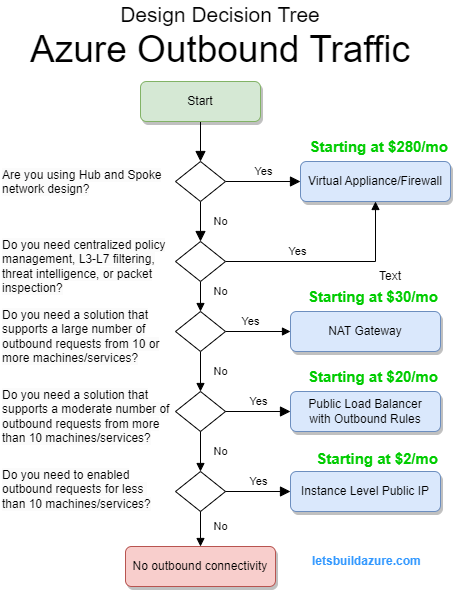
    Opinionated decision tree

    Virtual Appliance/Firewall (My Preference)

    This is a “go-to” design for enterprise security. I am disappointed how little focus the aforementioned article gave to this approach. This design effectively shifts details for managing Internet outbound requests to the firewall implementation, thereby reducing concerns on how to achieve outbound Internet connections from the spoke VNET. In other words, the team creating application specific infrastructure going into the VNET (the “applistructure”) only has to make sure the firewall will allow requests to the destinations – they don’t need to worry about implementing other methods described in this article.

    When you are using the previously described hub-and-spoke design, user defined routes (UDRs) send requests destined outside the immediate VNET (targeting public Internet, other spokes, VPN gateways, etc.) to a firewall that resides in the hub VNET. This can be either an Azure Firewall or, if you prefer 3rd party solutions, a Virtual Appliance like Palo Alto, Cisco, Checkpoint.

    In the hub-and-spoke rant above, I link to articles describing different methods to implement that pattern and those all include details about enabling firewalls in the hub.

    Regardless of the technology, the firewall is responsible for SNATing outbound requests to the public Internet – but it only allows requests if firewall rules agree.

    Pointing to the analogy, the firewall is like a courier that handles forwarding the package to it’s destination. Unlike other methods described in this article, this Firewall Courier applies their own set of rules to ensure the destination is acceptable. The Firewall Courier may even inspect contents of the package to make sure nothing that shouldn’t be sent gets sent.

    NAT Gateway

    This approach is the most scalable method of managing outbound requests, but it is not the most secure – it doesn’t apply any restrictions to outbound requests.

    There are a few situations to use the NAT Gateway approach.

    • Hub-and-spoke with a firewall is just too much for the situation (too complicated, too costly and you don’t need the security, etc.), AND you need more scalability than Public Load Balancer or Public IP options provide
    • The hub firewall has outbound requests exceed capacity (SNAT exhaustion) of Public IP or Public Load Balancer so you need to place NAT Gateway between the firewall and the public Internet
    • The hub firewall appliance cannot be associated with Public IP addresses or use Public Load Balancer (for some odd reason)

    Reverting to the analogy, the NAT Gateway Courier doesn’t apply rules to determine if the destination is acceptable nor does it inspect package contents. This means, if you are directly sending traffic to a NAT Gateway, NSGs are the only method you can use to control acceptable destinations (which can be a very complex endeavor). Of course, if the Firewall Courier is subcontracting to NAT Gateway Courier, the Firewall Courier is only passing along packages that have been approved (so you get both scalability of NAT Gateway and security of a firewall).

    Dive Deeper into NAT Gateway

    Azure NAT Gateway documentation provides a lot more detail on how the NAT Gateway scales and can be implemented.

    Public Load Balancer with Outbound Rules

    WARNING: Understand the risks whenever you put VMs behind a Public Load Balancer

    The public Internet is more vicious than you think. If you don’t believe me, create a honeypot and see how long it takes for your machine to get attacked or even fully pwned – you may even find your device in search results on shogun.io

    This design leaves all the VMs receiving traffic from the Public Load Balancer exposed to the public Internet – so inbound NSGs are essential. NSGs provide a line of defense before inbound packets get to the VM itself (and NSGs have a default rule that denies all inbound requests from the Internet).

    If you putting a pool of virtual appliances behind the Public Load Balancer, that is a bit different scenario (vendors harden those machines) but NSGs are still recommended to ensure administration ports cannot be accessed by untrusted sources over the public Internet.

    Having fully emphasized the security concerns, this design has limitations:

    • All VMs sending outbound traffic through the Public Load Balancer must be in the same VNET
    • If VMs send too much traffic through the Public Load Balancer (SNAT exhaustion), you need to associate more Public IP addresses with the Load Balancer’s front end. There is a limit to the number of Public IP addresses you can associated with the Public Load Balancer so there is a true-limit – but honestly, if you have that many VMs in the same VNET, you may want to reconsider your network design.

    Dive Deeper into Public Load Balancer

    Use Source Network Address Translation (SNAT) for outbound connections describes this approach in more detail, but it also describes several of the outbound methods in this article.

    Instance Level Public IP Address

    WARNING: Understand the risks whenever you associate a Public IP address with a VM

    Just like the Public Load Balancer approach, inbound NSGs are critical if you use this design.

    From a cost and scalability perspective, this design only provides a single VM the ability to communicate with the Internet. Other VMs in the same network cannot connect to the Internet. If you need to enable outbound communication on many VMs, consider one of the other approaches.

    In Closing

    There is no silver-bullet to enabling outbound connectivity, however each approach has trade-offs to security, scalability, and cost. After reading this and examining the decision tree you are well-equipped to move from problem (my VMs can’t initiate requests to the public Internet) to solution (one of the four approaches described in this article).